Writing · Android · CI/CD
“Mobile” development
A remote Android development loop: GitHub Actions tests and signs the build, then Firebase delivers it back to my phone.
I was in the middle of making myself a personalized expense tracker android application. I am using native android development because it makes reading notifications easier to read and thus, I didn't have all the expo tools that I was used to (I have used expo once XD). Everytime I wanted to test my application on my phone I had to plug in the phone, turn on usb debugging and install it into the device. The plugging in part was ok but I discovered some banking apps dont usually let us open them when usb debug is on. This led me to look into how I could get the latest version of my application on my phone.
Then I got my hands on codex, it was the Astra hype train that led me to buy a month's subscription. Everything else I had already used except the remote control feature. Now i could tell codex to make changes to my android app from my phone but needed a way to get that back to my phone and now i wanted to do it from anywhere not just in front of the laptop but from a random place with wifi and my laptop happily coding at home. I considered using tailscale, both the devices will be in the same network adb install it into my phone and go my merry way. But that doesn't sound cool so I made a whole CI/CD pipeline to get my app.
Phone → Codex remotely → laptop → GitHub → CI → Firebase → phone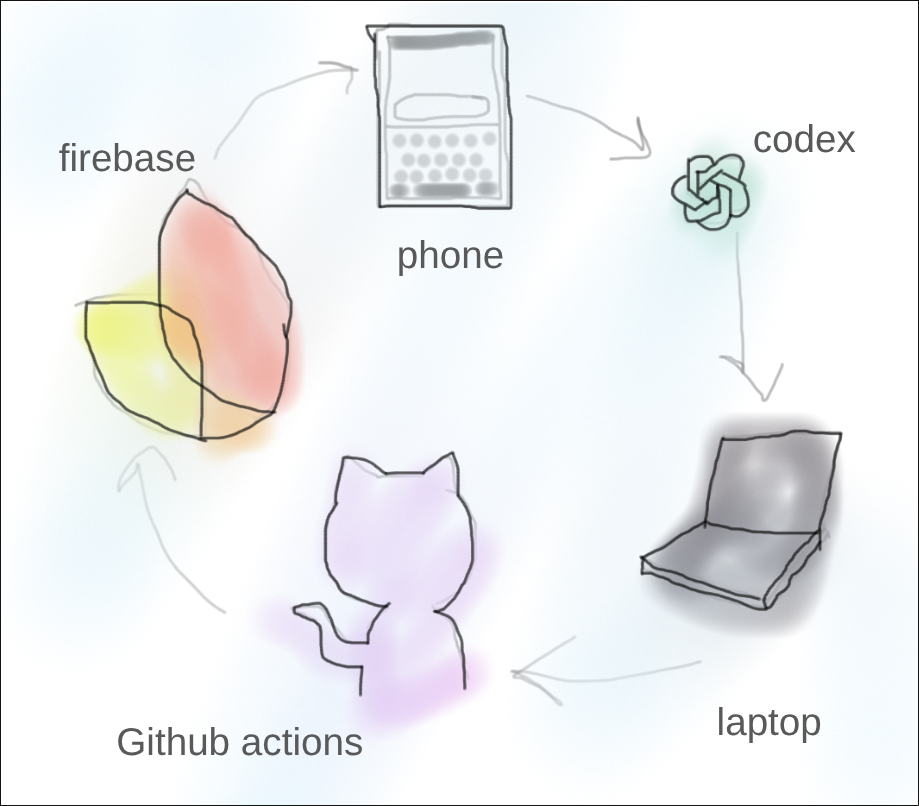
Making the handoff work
So it gets triggered by a push to the main branch, once something comes up, start cooking up the code using Github actions making it the “main” hand off point between codex and the phone with the power of the internet. The most boring one time was to set up the different accounts related to Firebase and google cloud so the big dogs can handle the complicated distributing stuff over the internet parts. I had painstakingly generated secrets like:
- Firebase Android configuration: it is like an identifier of the both Firebase project and android application so CI knows who we need to go and bonk.
- Android release keystore: something like a key with which only i can push updates to my app.
- Firebase service-account credentials: lets Github do the uploading apps to Firebase, meaning no manual uploads.
- Firebase tester-group alias: Who to send the new release, me of course.
I used Github secrets to store these because they are really important stuff and are injected into the runner when the action runs.
A quick explainer on a tester group is that we can make a group of emails to whom the latest release of the application is sent once we have a new version released, for this project the qa team was me so ow i could get the APK sent to me through mail, downloading the “App tester” app makes it easier but i wanted to make the flow more smooth. The secrets are some important stuff which helps us not get spoofed by other apps claiming to be the legit updates by authenticating the build and delivery process but don't care so I will keep my explanation about these stuff as is, as knowing this much was enough for me to get things done.
Keeping data safe while testing
Setting up these things with the help of gemini attached directly to the firebase and google console was time consuming but didn't take long enough to get boring, the main road block i was facing was getting my local data wiped on updates, when we had the database in a different schema or sometimes with no apparent reason. I wanted guardrails in this pipeline also so i dont lose all the transactions and personal finance data on a random Tuesday. Other things for my sanity was csv import/export because i didnt trust the local room database. So I wanted to test not just that it builds but also that it accepts the old schema or not and with an emulator setup done anything can be tested when we have an emulator. The major dumb move for the first CIwas keeping everything under the same runner which exhausted the memory in the container that was trying to do the tests. Using free private repo in github has its limitations, but it is letting me do a lot of stuff so I cant complain alot.
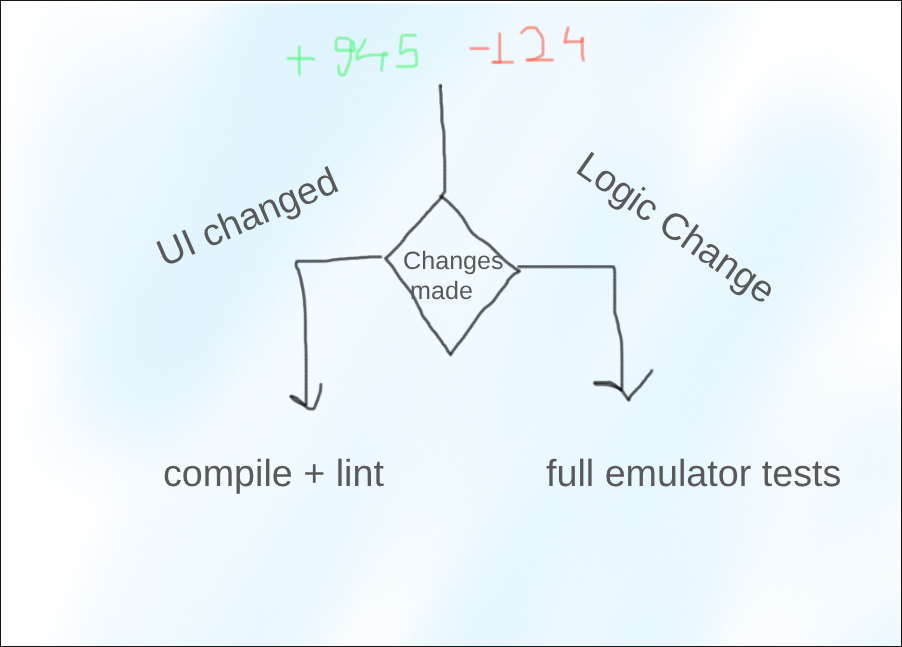
Then I divided it into parts. One builds the APK and tests it, and then we relay race it along the other runner where the second one props up an android emulator and instrumentation tests run there and results in long times, the whole action took more than 18 minutes. This is good for being sure that the new release will run properly with all the tests passed and the data wont get wiped but, we don't need to trigger the whole flow when we have changed the “save” button from green to Emerald and wait the whole 18 minutes. So, we have a smart CI that tracks the changes and triggers runners that make sense, ui changes then we just need to test if it compiles and business logic and database changes then the whole 18 minutes flow is triggered.
Back to the phone
Now after all the tests are done, the Github action signs the APK we have just made and tested with the release keystore that makes the application in my app to trust the new updates coming its way and uploads it to Firebase app distribution the version updated. Locally, the application on start up looks at the version metadata from Firebase Remote Config and using the version it has currently compares if a new version has come up and tells the user to update the application if any new version is seen.
I did not set out to build a full CI/CD system. I just wanted to update my Android app without plugging in a cable every time or having USB debugging interfere with banking apps. But that small problem led me to a workflow where I can make changes remotely with Codex, let my laptop at home prepare the build, have GitHub test it, sign it, and send it to my phone through Firebase App Distribution.
It is not completely hands-off. The initial Firebase and GitHub setup still needs human work, real-device testing still matters, and Android still asks for confirmation before installing an update. But the development loop is now repeatable, secure, and available from almost anywhere with Wi-Fi. I did not just automate an Android build but ended up creating my own version of “mobile” development.